

















Insights: see why and what was learned
The four Insights sections show what the engine learned and why a product is recommended. Nothing in them changes your shop, except hiding a pair and deleting recorded data, which ask you first.
Explorer
“What would your shop recommend for this product?” The Explorer starts with your best seller and asks every strategy at once. Search another product by name, reference or EAN, and the results change.
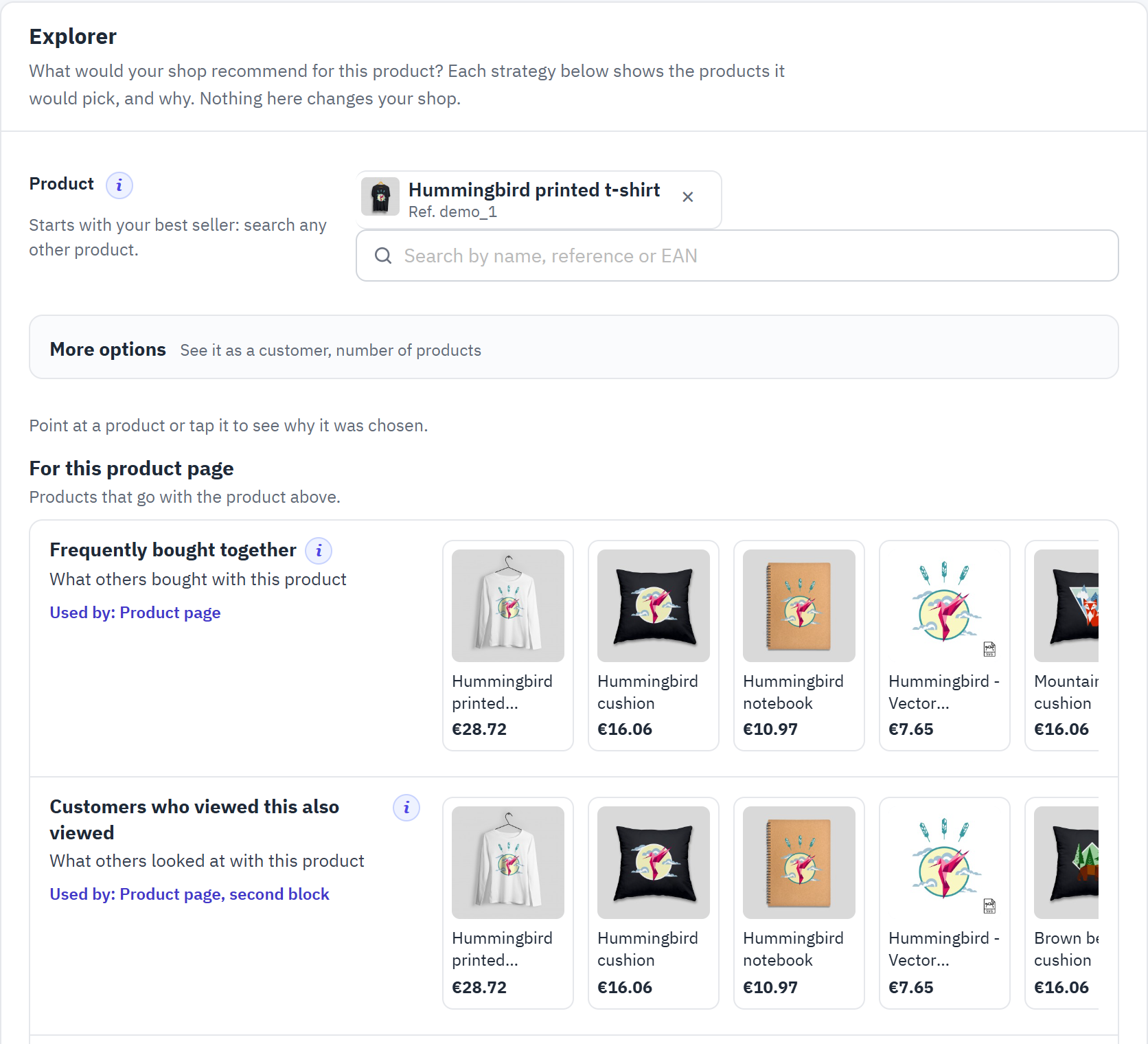
- Product: the product the strategies are asked about.
- More options: see the recommendations as a given customer sees them, and change the number of products.
- The strategies in three groups: For this product page, For this visitor and For everyone.
- One strategy: the products it finds, with the blocks that use it (“Used by:”).
Point at a product (or tap it) to see why it was chosen: “Bought together in 26 orders”, “Viewed together by 41 visitors”, “Pinned by a rule”, “From a complementary category (rule)”, or the trending figures. The strategies that follow each visitor say “Changes with each visitor”: to see what a customer would get, click Choose a customer in the For this visitor group (it opens More options), or type the customer’s e-mail address or name in the product search and pick See it as this customer: followed by their name. At the bottom, See a block in your theme draws a block for the product, at desktop, tablet and phone width.
Product pairs
The products your customers buy together (from your orders) and look at together (from the recorded visits). They feed the “bought together”, “viewed together” and “complete your purchase” recommendations.
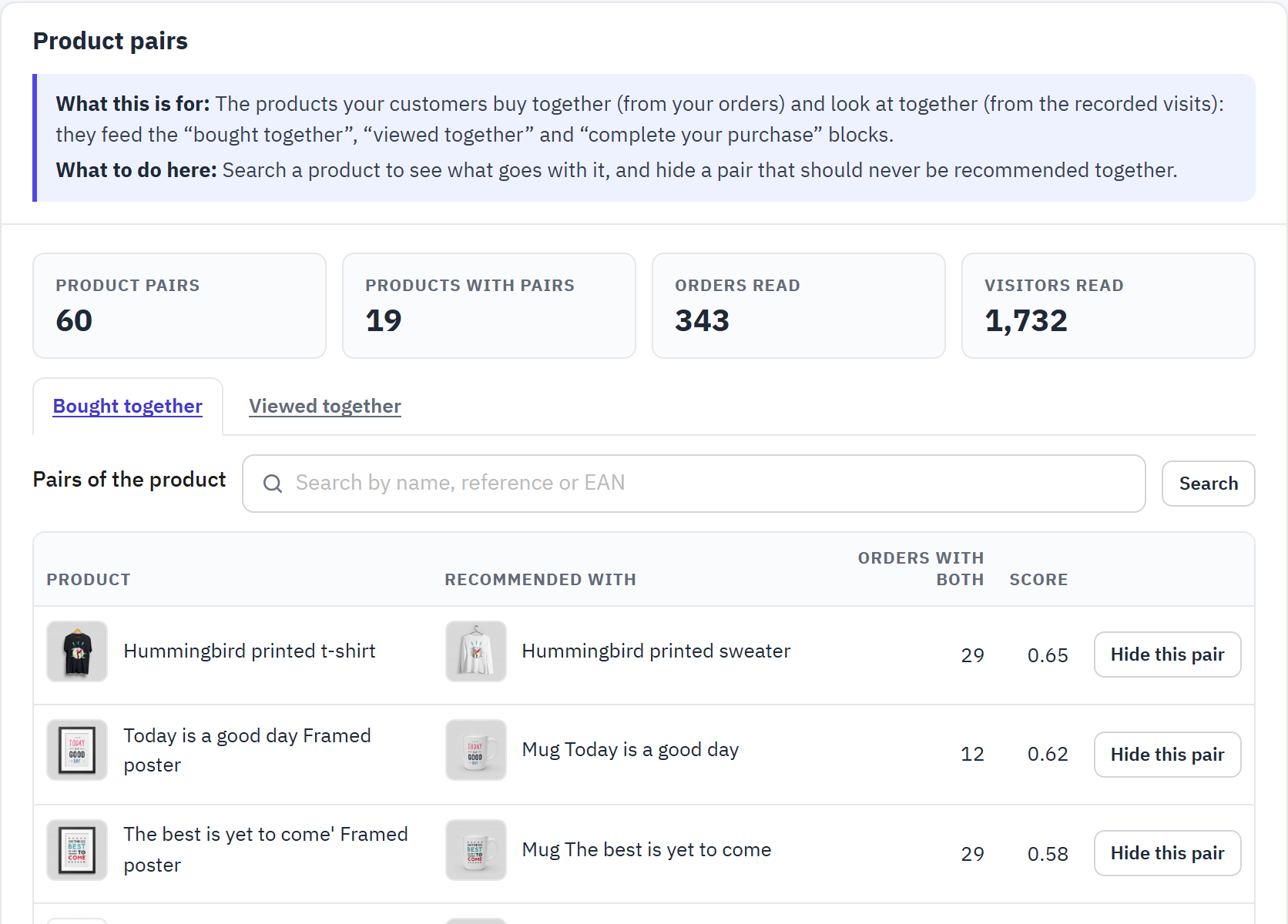
- How many pairs and products with pairs were found, from how many orders and visitors.
- Bought together or Viewed together.
- Search a product to see only the pairs it belongs to.
- Orders with both (or visitors with both) counts how often the two products came together; Score, from 0 to 1, how strongly they go together compared with how often each one appears on its own.
- Hide this pair keeps two products apart in every block (it adds a Never together rule). Recently hidden pairs lists them, and Undo shows them together again.
- Preview another period shows which pairs another order (or browsing) history would find; nothing changes until you click Use this period.
Trending and best sellers
The products “Trending now” and “Best sellers” show, in the order the engine ranks them, with the figures behind the ranking. They also complete the blocks whose own strategy finds too few products.
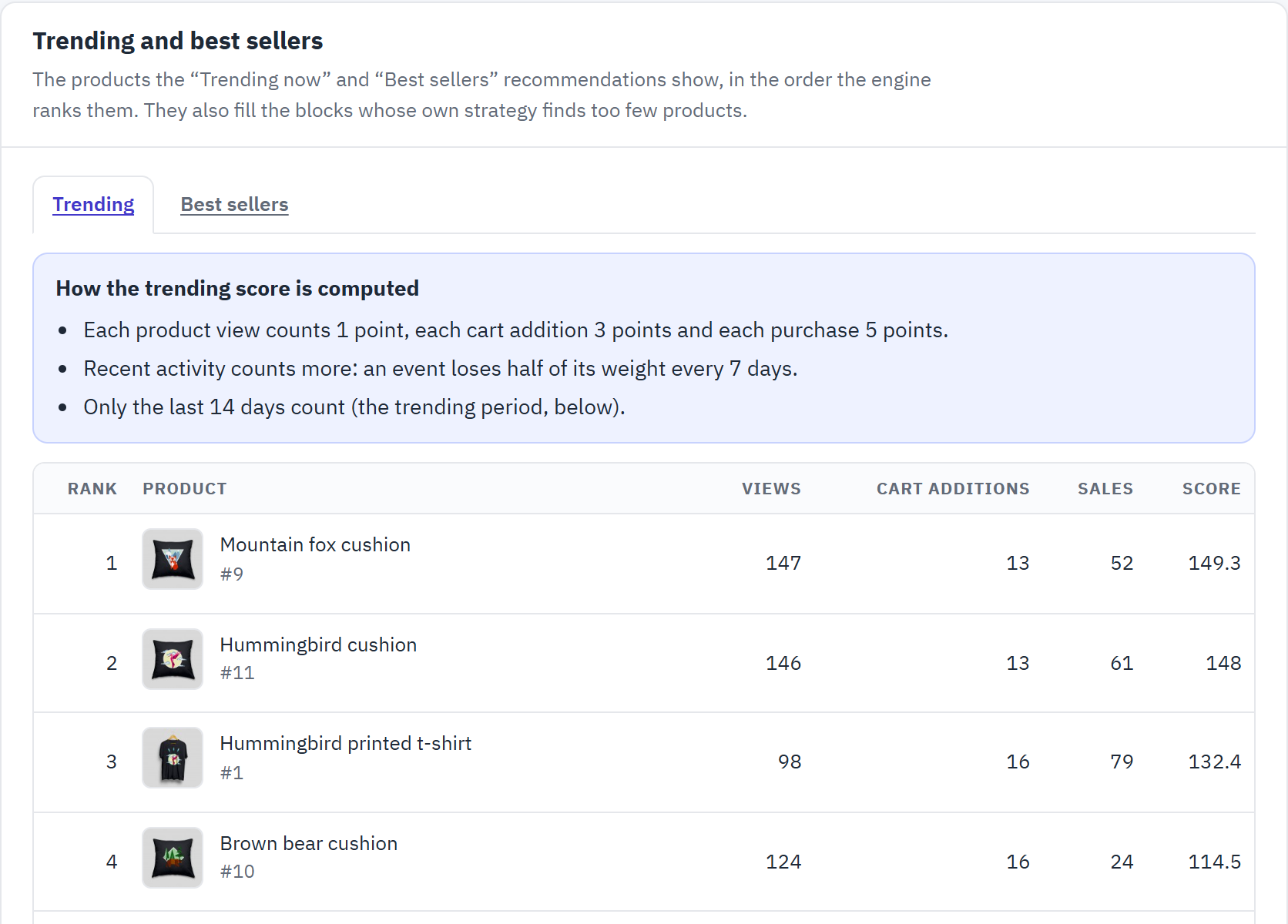
- Trending or Best sellers.
- How the trending score is computed: each product view counts 1 point, each cart addition 3 points and each purchase 5 points; an event loses half of its weight every 7 days.
- The ranking, with the views, cart additions, sales and score of each product.
Trending period sets how many days of activity count (7 to 90 days, default 14). Preview another period ranks the products on another period without saving it, so you can compare before you choose.
Recorded data
What the module recorded of your visitors’ behaviour: product views, cart additions and purchases. It stores a customer or visitor number, never a name, an email address or an IP address.
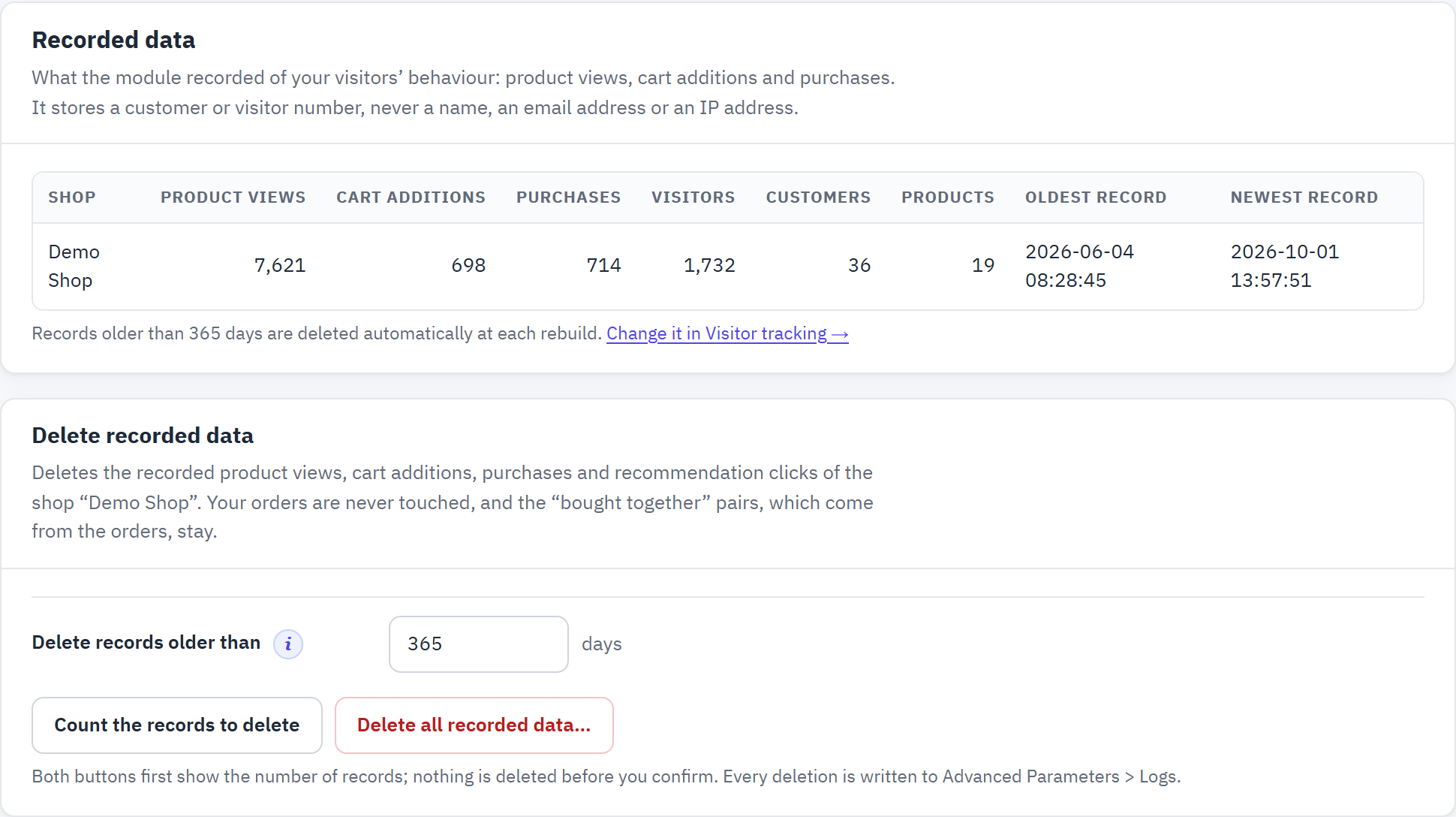
- Per shop: product views, cart additions, purchases, visitors, customers, products, and the oldest and newest record.
- Records older than the period of Visitor tracking are deleted automatically at each rebuild.
- Delete records older than a number of days: Count the records to delete first shows how many would go.
Delete all recorded data… deletes the product views, cart additions, purchases and recommendation clicks of the shop. Both buttons first show the number of records, and nothing is deleted before you confirm. Your orders are never touched, and the “bought together” pairs, which come from the orders, stay. Every deletion is written to Advanced Parameters › Logs.
Space on your database
Space on your database lists the module’s tables with what each one holds, its rows and its size (data and indexes, every shop together). Under the total, it says how many events the module records a day, how much space they take, and the size the tables reach at that pace once the retention period of Visitor tracking is full: a shorter period keeps it lower. Above the threshold of Warn me when the module’s data is larger than, the page, the dashboard and the checklist warn you. When your shop records PrestaShop’s own statistics, their size is shown too: they are not the module’s tables, and PrestaShop’s Stats clears them.
Settings: Engine, Visitor tracking, Python service
The Settings group holds what the engine learns from and when, what is recorded of your visitors, and the optional Python service. The defaults suit most shops: change them when the checklist suggests it.
Engine
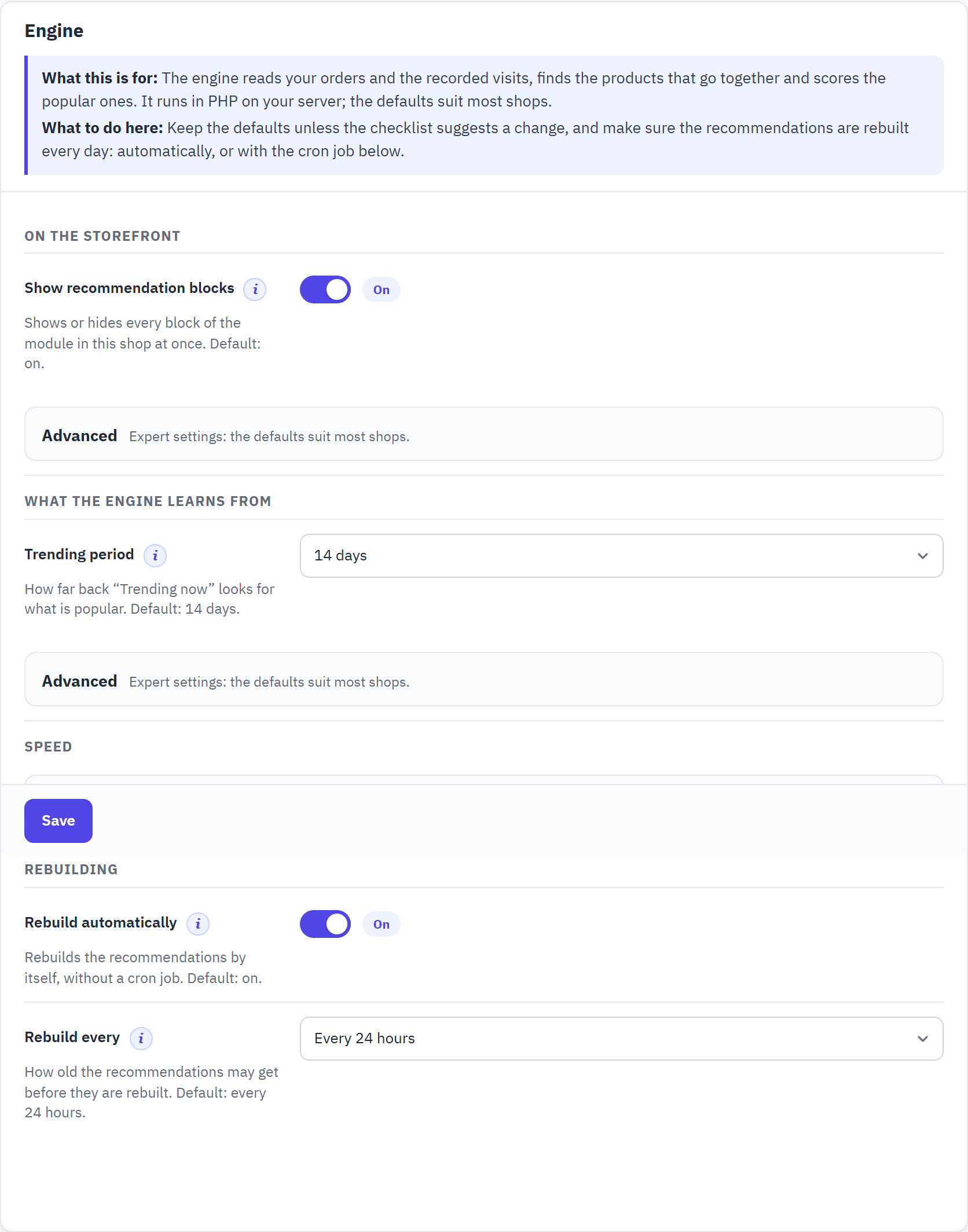
- On the storefront: the main switch of the blocks, and loading them after the page.
- What the engine learns from: the periods of history and the thresholds.
- Speed: reusing computed lists.
- Rebuilding: the automatic rebuild and how often.
| Setting | What it does |
|---|---|
| Show recommendation blocks | Shows or hides every block of the module in this shop at once; the engine keeps learning. Switch it off to pause the recommendations without losing any setting. Default: on. |
| Load the blocks after the page (Advanced) | The page is sent without the blocks, then the visitor’s browser asks for them. Switch it on when a page cache serves your pages (chapter 18). Default: off. |
| Order history (Advanced) | How many days of orders the engine reads for the products bought together and the best sellers. Default: 365 days. Longer finds more pairs in a small shop; shorter follows recent tastes. |
| Browsing history (Advanced) | How many days of product views it reads for the products viewed together. Default: 90 days. |
| Also learn from PrestaShop’s statistics | When PrestaShop’s Data mining for statistics module recorded the pages each visitor viewed (its option Save page views for each customer), the engine also reads the product views it stored before this module started recording, within the browsing history. They feed “Customers who viewed this also viewed” and “Trending now” from the first day, never one visitor’s “Recommended for you”: PrestaShop records its statistics without asking for cookie consent. Nothing is copied. Default: off. Robots are left out: guests without a recognized browser, guests who opened one product page only (for “Trending now”), and crawlers that opened more than 50 products. |
| Trending period | How far back “Trending now” looks. Default: 14 days. |
| Minimum shared orders (Advanced) | How many orders (or visitors) must share two products before they count as related. Default: 2. Raise it in a large shop to keep only strong links; 1 helps a new shop. |
| Minimum history for personal picks (Advanced) | How many products a visitor must have viewed, added or bought before “Recommended for you” follows their own history. Default: 1 product. |
| Reuse computed lists, Reuse computed lists for (Advanced) | Keeps each computed list for a while, so pages stay fast. Default: on, 60 minutes. Lists made for one visitor are never reused for another. |
| Rebuild automatically | Rebuilds the recommendations by itself, right after a storefront page has been sent to a visitor, so nobody waits. Default: on. Applies to every shop. |
| Rebuild every | How old the recommendations may get before they are rebuilt: every 6, 12, 24 or 48 hours. Default: every 24 hours. |
Cached lists and the last build
Cached lists says how many computed lists the shop keeps now. Clear cached lists is safe: the next page views compute them again, for example right after you changed rules or excluded products. Last build shows, per shop, when it was built, how long it took, and how many “bought together” and “viewed together” links and scored products it found. Rebuild recommendations at the top of the page rebuilds the shop you are editing now.
Daily rebuild with a cron job
Optional: a cron job of your hosting calls the module once a night, so the rebuild never waits for a visitor. It is recommended on slow hosting and on shops with many orders. Paste one of the lines the section gives you; each has a Copy button.
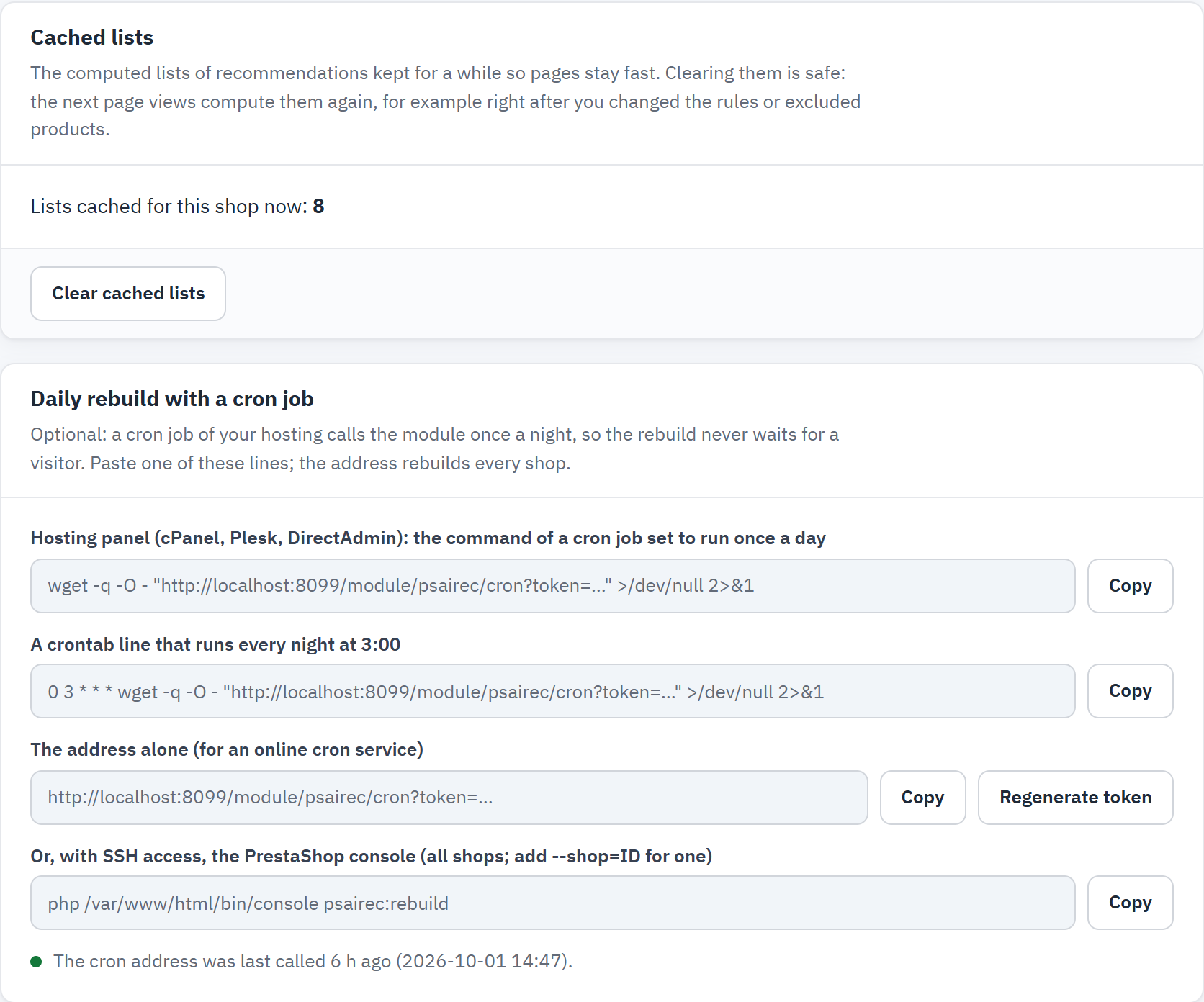
- Clear cached lists.
- The command for the cron job of your hosting panel (cPanel, Plesk, DirectAdmin), set to run once a day.
- Hosting panel: the command of a cron job set to run once a day.
- Crontab: a line that runs every night at 3:00.
- The address alone, for an online cron service.
- With SSH access: the PrestaShop console,
php bin/console psairec:rebuild(all shops; add--shop=IDfor one).
The address contains a secret token: keep it private. Regenerate token makes a new address (paste it again in your cron job). The section says when the address was last called; the checklist warns when it has not been called for 48 hours and the automatic rebuild is off.
Visitor tracking
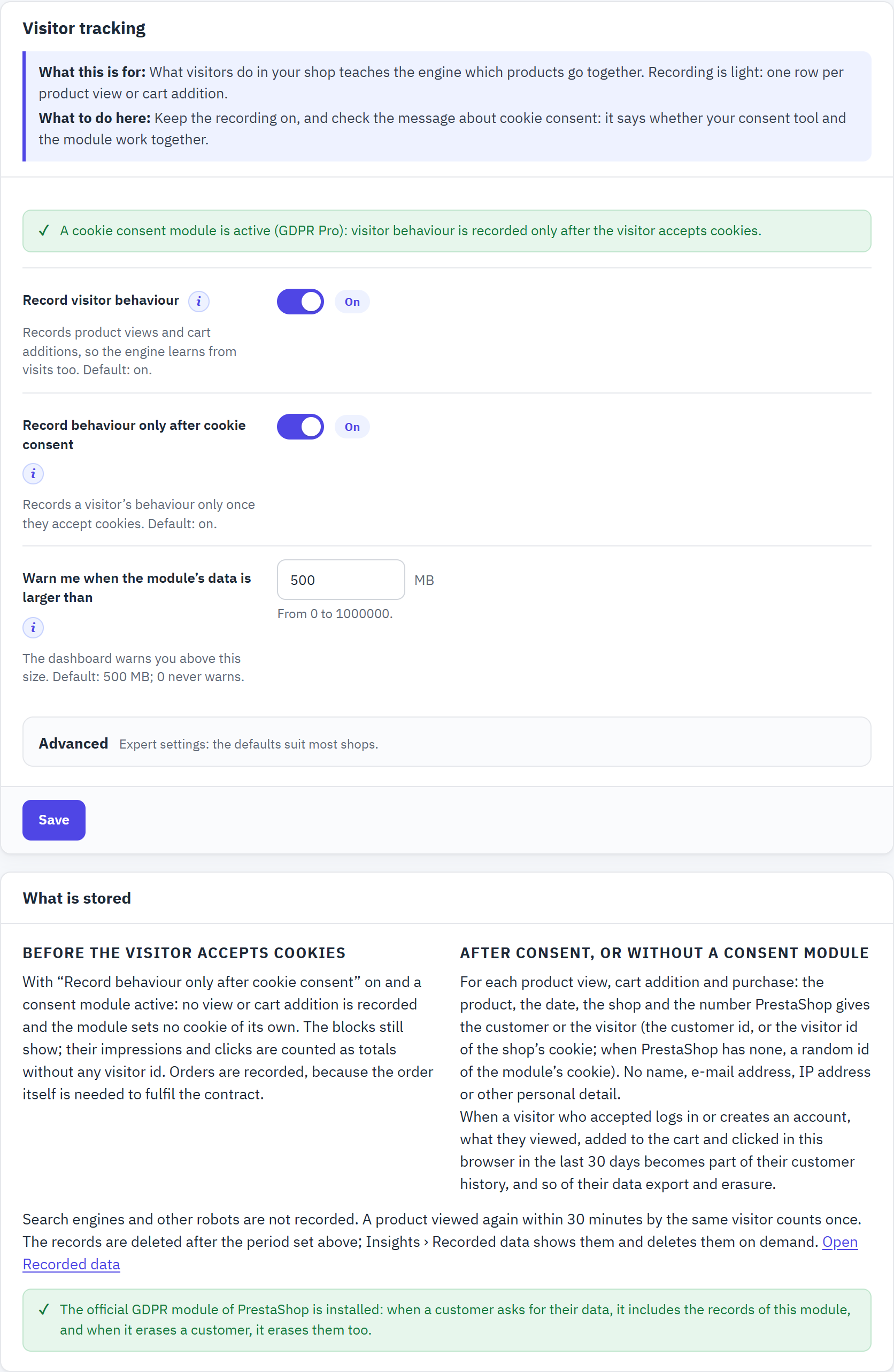
- Whether your cookie consent tool and the module work together.
- Record visitor behaviour: product views and cart additions, which “viewed together”, trending, recently viewed and personal picks need. When it is off, the engine uses your orders only. Default: on.
- Record behaviour only after cookie consent: with a consent module, views and cart additions are recorded only once the visitor accepts cookies. Default: on.
- What is stored, before and after consent.
Keep recorded behaviour for (Advanced) deletes the records older than this at the next rebuild. Default: 365 days; keep it at least as long as the Browsing history of Engine. Robots are never recorded, and a product viewed again within 30 minutes by the same visitor counts once. chapter 17 explains consent and what is stored.
Warn me when the module’s data is larger than sets the size of the module’s tables above which the dashboard and the checklist warn you, with the ways to reduce it. Default: 500 MB; 0 never warns. It applies to every shop, because the module’s tables are shared.
Python service (optional)
For large shops with many customers who order several times: a separate service (Python, LightFM) trains a model of your customers and writes their personal picks back to the shop, for the blocks with “Recommended for you”. The module works fully without it, and keeps working when the service is down.
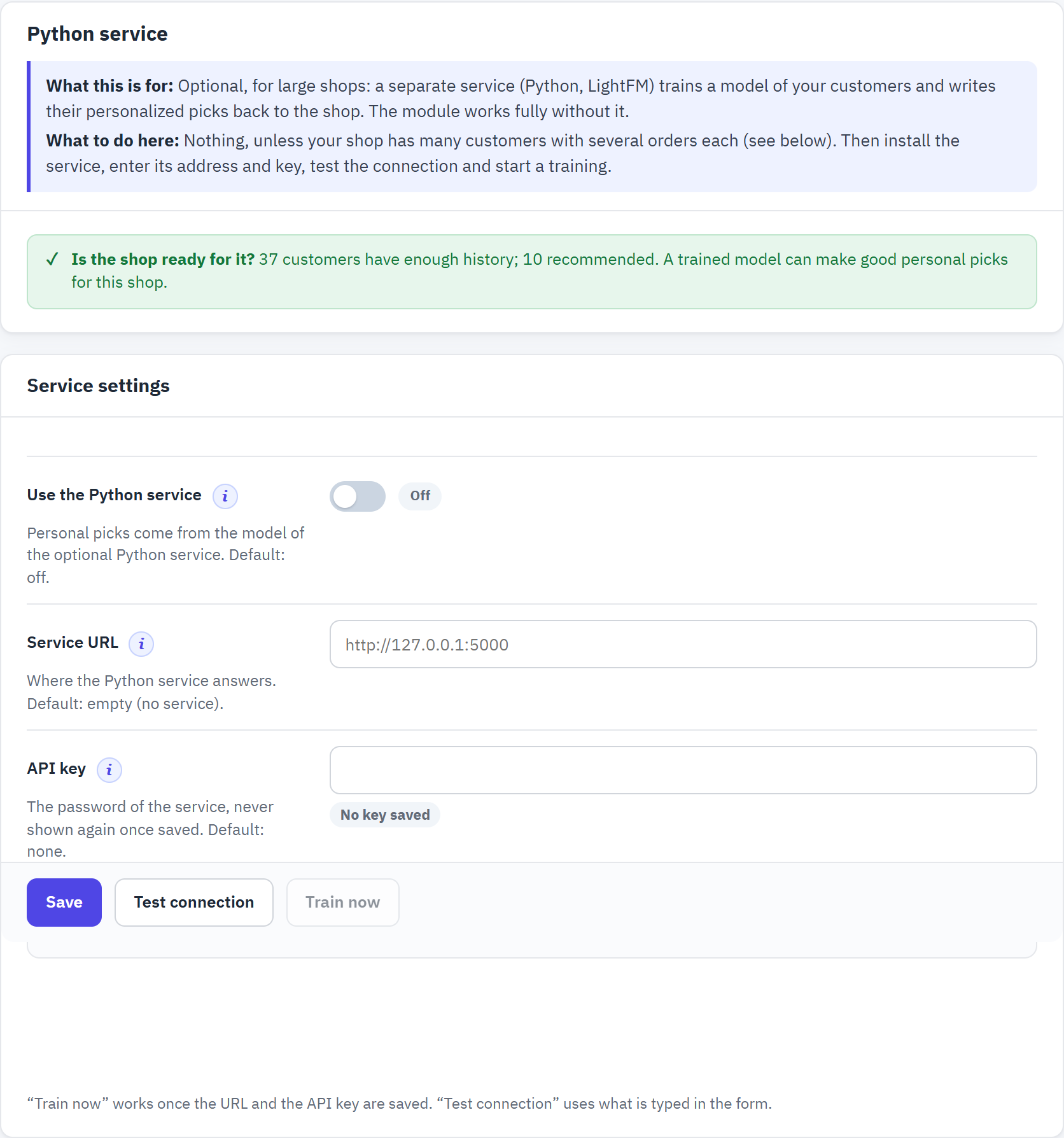
- Is the shop ready for it? How many customers have enough history. Until enough do, the module’s own engine gives better personal picks.
- Use the Python service. Default: off.
- Service URL: where the service answers, for example
http://127.0.0.1:5000on the same server. - API key: the key set as
PSAIREC_API_KEYon the service. It is never shown again once saved. - Test connection checks what is typed in the form.
- Train now starts a training, once the URL and the key are saved.
- Run the psairec-python service (Docker image or Python 3.11) on a server that can read your shop’s database, with a long random API key.
- Enter its address and the same key, save, and click Test connection.
- Click Train now and wait until Test connection shows the training has finished.
- Switch Use the Python service on for the shops that should use it. Train the model (Advanced) sets how often it is trained again (default every 7 days); Recommendations kept per customer how many products it writes per customer (default 50).
Multistore, languages and titles
The module learns and recommends per shop, and shows every block title in the language of the visitor.
Several shops
- Each shop learns from its own orders and visits, and has its own blocks, styles, rules, A/B tests, checklist and results.
- Choose the shop in PrestaShop’s shop selector at the top of the back office before you change anything. Rebuild recommendations rebuilds the shop you are editing.
- With all shops or a shop group selected, the page says so: “Multistore: you are editing the defaults of all shops. A shop with a value of its own keeps it; choose a shop in the shop selector to edit only that shop.” Settings saved there apply to every shop that has no value of its own.
- A few settings are the same for every shop: Rebuild automatically, Rebuild every, the cron address, and the Service URL and API key of the Python service. Use the Python service is chosen per shop.
- The cron address rebuilds every active shop in one call (section 15.2).
Languages and block titles
The back office of the module is in English, French, Spanish, German, Italian, Polish, Romanian and Hungarian, following each employee’s language.
Your customers see each block’s title in their language. Built-in titles exist for English, French, Spanish, German, Italian, Polish, Romanian, Hungarian and Dutch; they are written at install for every language of your shop, and also for a language you add later. A title you write yourself is never changed.
| Strategy or block | Built-in English title |
|---|---|
| Recommended for you | Recommended for you |
| Frequently bought together | Frequently bought together |
| Customers who viewed this also viewed | Customers who viewed this also viewed |
| Complete your purchase | Complete your purchase |
| Next to Add to cart (similar products) | Available alternatives |
| Add-to-cart pop-up (complete your purchase) | Customers also bought |
| Other strategies | Their name: Similar products, Premium alternatives, Recently viewed, Buy it again, Trending now, Best sellers, New arrivals |
To write your own titles, open a block with Edit and type the Title of each language (the language code at the right of the field switches it). In the list of blocks, Titles shown to customers in: shows the titles of one language; a title that is still the English one in another language is marked “Not translated”. The live preview of a block has the same language tabs.