

















AI Product Recommender — Documentation
AI Product Recommender shows every visitor the products they are most likely to add next. It learns from your own orders and from what your visitors look at, shows the recommendations where customers decide, and tells you what they bring — all inside PrestaShop, with no outside service to subscribe to and no customer data leaving your shop. This guide covers installation and setup, the blocks and the eleven strategies, styles and rules, A/B tests, sales, insights, settings, multistore, privacy and troubleshooting.
What the module does for your shop
AI Product Recommender shows every visitor the products they are most likely to add next. It learns from your own shop, your orders and the products your visitors look at, shows the recommendations where customers decide, and tells you what they bring. Everything runs inside PrestaShop: there is no outside service to subscribe to, nothing to import, and no customer data leaves your shop.
Three things it does
1. It learns from your shop
- Products bought in the same orders: “bought together”.
- Products the same visitors look at: “viewed together”.
- What is popular right now, and your best sellers.
- Past orders are read at install, so the first recommendations are ready at once.
2. It shows them where they sell
- Thirteen places: product page, next to Add to cart, the add-to-cart pop-up, cart, category pages, home page, order confirmation, the customer account and more.
- In your theme’s own product cards, as a grid, a carousel, a compact list or a “Frequently bought together” bundle.
3. You see what it brings
- Impressions, clicks, and the orders and sales that followed a click, per block.
- The share of your shop’s sales.
- A/B tests prove a strategy on part of your visitors before you switch.
Around these three, you stay in control: every strategy is explained in plain words, a live preview shows a block in your theme before you save, your own rules come first (always show a product first, keep two products apart, recommend the accessories of a category), and you can leave out products and categories.
What your customers see
On the product page, the “Frequently bought together” bundle shows the product with up to three products that other customers ordered with it, the total price and one Add all to cart button. Further down, a second block can show what other visitors looked at. When a product cannot be ordered, “Available alternatives” appears next to the Add to cart button; in the add-to-cart pop-up and in the cart, the module suggests what goes with the cart. chapter 7 shows every place.
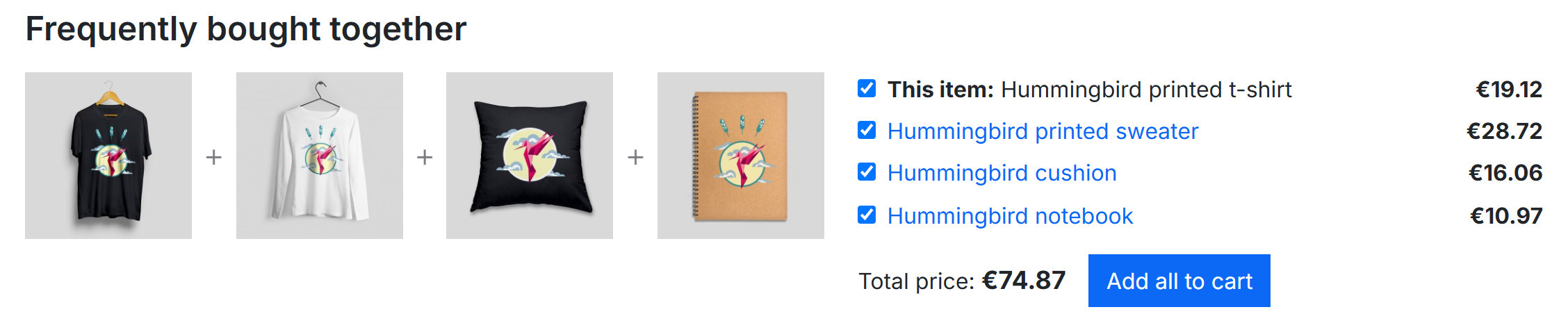
- The product of the page and the products bought with it.
- A tick box per product: the customer unticks what they do not want.
- The total of the ticked products, updated at once.
- Add all to cart adds every ticked product in one click.
What you see in the back office
The module has one page, Catalog › Product recommendations. It opens on Get started, four short steps for the first setup (chapter 4), and then on the Dashboard: a sentence that says whether the recommendations work, four tiles (learning, blocks, visitor data, results), a map of your pages with each block at its place, and the points that need your attention (chapter 5).
Who it is for
- Every shop on PrestaShop 8 or 9 that wants bigger baskets and more second orders, without configuring an outside “AI” platform.
- Small shops start on the first day: the module reads the orders you already have, and completes a block with similar, trending or best-selling products while it has too little history.
- Large shops with many returning customers can add the optional trained model of the Python service for the personal picks (section 15.4). The module works fully without it.
About this guide
Labels in bold are written exactly as the back office shows them; Catalog › Product recommendations is a path of menus. The screenshots come from a demo shop with a few hundred orders on the PrestaShop demo catalogue, so your figures will differ. The numbered circles on a screenshot are explained in the list under it.
Requirements and compatibility
The module runs in PHP inside your shop, on ordinary shared hosting. Nothing else needs to be installed for the recommendations; the Python service is an option for large shops.
| What | Supported |
|---|---|
| PrestaShop | 8.0 to 9.x |
| PHP | 7.2 to 8.5 (whatever your PrestaShop version accepts) |
| Themes | Classic, Hummingbird and the themes built on them. A block shows where your theme prints the matching place (hook); the dashboard warns when a block you switched on has no place in your theme, and a widget tag puts a block anywhere (section 6.8). |
| Multistore | Yes: settings, blocks, styles, rules, tests and figures per shop (chapter 16). |
| Back-office languages | English, French, Spanish, German, Italian, Polish, Romanian, Hungarian. |
| Block titles for customers | Built in for English, French, Spanish, German, Italian, Polish, Romanian, Hungarian and Dutch; any other language gets English until you write its titles. |
| Cookie consent | GDPR Pro is read directly; any other consent tool connects with one line of script (section 17.2). |
| Server | No Redis, no extra cache server, no outside service. A cron job is optional: the recommendations rebuild themselves once a day. |
| Optional Python service | For “Recommended for you” on large shops: a separate service (Python 3.11 or its Docker image) on a server that can read your shop’s database. |
What the module reads, and when
- Your orders: the valid orders of the last 365 days (the period can be changed), to find the products bought together and your best sellers.
- Product views and cart additions of your visitors, recorded by the module itself from the day it is installed, when the visitor accepted cookies if your shop asks for consent.
- Your catalogue: categories, brands, features and prices, for similar products and premium alternatives.
The engine turns this into lists of related products once a day. The pages of your shop then only look these lists up, so the blocks cost your pages almost nothing.